

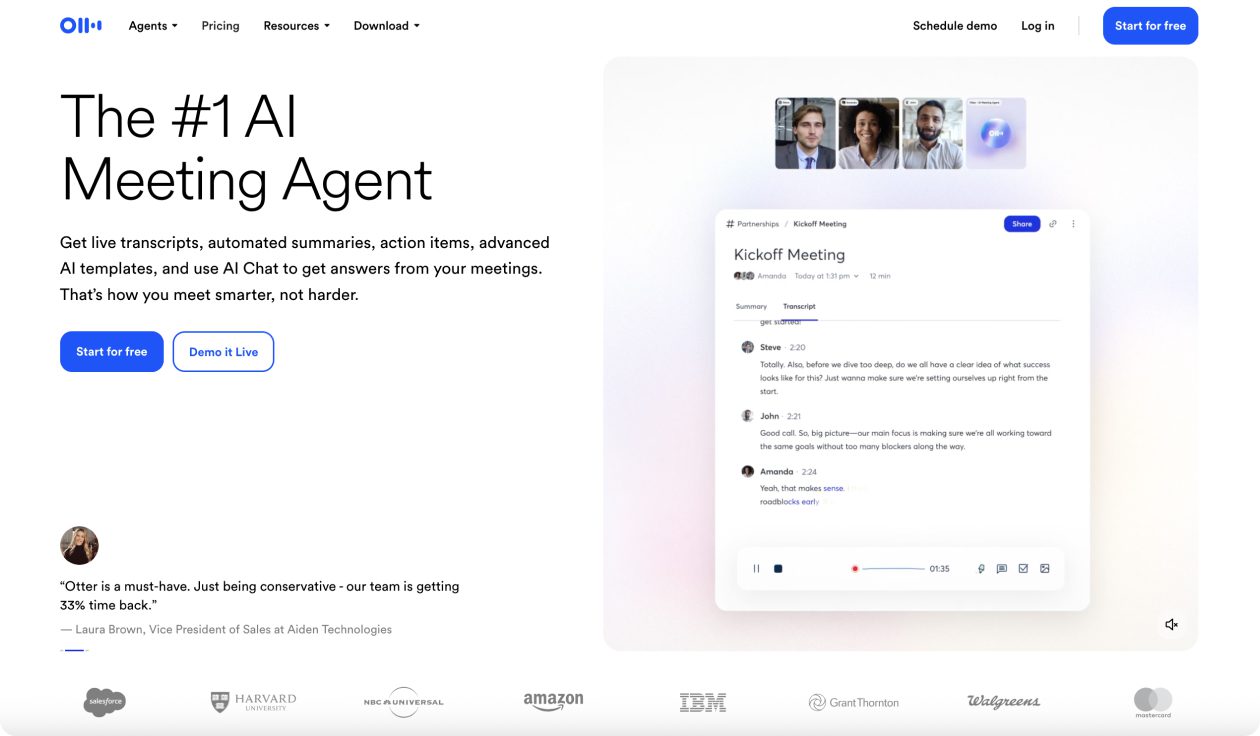
What is Otter.ai?
Otter.ai is the AI-powered meeting assistant that revolutionizes how UX researchers capture, analyze, and share insights from user interviews, usability sessions, and research meetings. Instead of frantically taking notes during user interviews or spending hours transcribing recordings, Otter automatically joins your sessions, creates detailed transcripts, and generates intelligent summaries with action items.
Otter auto-joins Zoom, Google Meet, and Microsoft Teams meetings to automatically take notes, allowing everyone to participate freely. For UX researchers, this means staying fully present with users while ensuring every insight, pain point, and user quote is captured with perfect accuracy.
Whether you’re conducting one-on-one user interviews, facilitating design thinking workshops, or running usability testing sessions, Otter.ai transforms your research operations by automating the documentation process and surfacing actionable insights that drive better design decisions.
Otter AI Key Features
- Automatic Meeting Transcription: Auto-joins Zoom, Google Meet, and Microsoft Teams meetings to automatically take notes, with speaker identification and real-time transcription in English, French, or Spanish.
- AI-Powered Meeting Summaries: Condense a 1-hour meeting into 30 seconds—Otter generates a 30-second summary, keeping everyone informed about key research findings and user insights.
- Automatic Action Item Capture: Automatically captures and assigns action items from the meeting, with complete context of the discussion, keeping everyone aligned on next steps for design iterations and research follow-ups.
- Otter AI Chat: Get answers and generate content like emails and status updates, using the power of Otter AI Chat across all your meetings. Perfect for creating research summaries and stakeholder updates.
- Real-Time Collaboration: Live transcription allows team members to follow along remotely, add highlights and comments in real-time, and annotate key user insights as they happen.
- Advanced Search & Keywords: Search through all your research sessions by keywords, speaker names, or date ranges. Find specific user quotes, pain points, or feature requests instantly.
- Custom Vocabulary Support: Add industry-specific terms, product names, and technical jargon to improve transcription accuracy for specialized UX research contexts.
- Multi-Format Export: Export transcripts as MP3, TXT, PDF, DOCX, or SRT files for integration with research repositories, presentation decks, or analysis tools.
- Mobile & Web Apps: Record user interviews on-the-go with iOS and Android apps, or use web recording for desktop-based research sessions.
- Team Collaboration Features: Share research insights via private channels, create folders for different projects, and enable team-wide access to user feedback and insights.
Otter AI Pricing
- Basic Plan: Free
- Pro Plan: $16.99/month (or $8.33 if billed annually)
- Business Plan: $20/month/seat when billed annually
- Enterprise Plan: Custom pricing
Otter AI Use Cases
- User Interview Documentation: Automatically transcribe one-on-one user interviews, identify speakers by name, and capture every user quote, pain point, and insight without missing critical details while maintaining eye contact.
- Usability Testing Sessions: Record think-aloud protocols during usability tests, capture user reactions and frustrations in real-time, and generate summaries of key usability issues and recommendations.
- Design Review & Critique Sessions: Document design feedback from stakeholders, capture design decisions and rationale, and create actionable lists of design changes and iterations needed.
- Research Planning Meetings: Record research planning sessions, capture research questions and hypotheses, and automatically generate action items for study setup and execution.
- Stakeholder Research Presentations: Record research readouts and stakeholder presentations, capture questions and feedback, and create follow-up action items for design and product teams.
- Focus Groups & Workshop Facilitation: Transcribe group discussions, identify individual speaker contributions, and extract themes and insights from collaborative design thinking sessions.
- Customer Discovery Interviews: Document customer development conversations, capture market insights and user needs, and organize feedback for product strategy and roadmap decisions.
- Accessibility Research Sessions: Record interviews with users who have disabilities, capture assistive technology usage patterns, and document accessibility requirements and pain points.
- Remote Research Coordination: Enable distributed research teams to stay aligned, capture insights from different time zones, and maintain consistent documentation across global research efforts.
- Research Repository Building: Create searchable archives of all user research sessions, build institutional knowledge that survives team changes, and enable easy retrieval of past insights.
Pros for Otter AI
- Complete focus on user: Stay present in interviews instead of frantically taking notes
- Perfect accuracy: Never miss important user quotes or insights due to manual note-taking errors
- Massive time savings: Eliminate hours of post-interview transcription and note cleanup
- Real-time collaboration: Enable stakeholders to follow research sessions live and add their own insights
- Searchable research archive: Find specific user feedback across months of research sessions instantly
- Automatic documentation: Generate research summaries and action items without manual effort
- Multi-language support: Conduct international user research with transcription in multiple languages
- Mobile flexibility: Record user interviews in any location with reliable mobile apps
- Cost-effective scaling: Handle more research sessions without additional manual transcription costs
- Seamless tool integration: Works with existing meeting platforms and research workflows
- Team knowledge sharing: Easy sharing of research insights across design and product teams
Cons of Otter AI
- Internet dependency: Requires stable internet connection for real-time transcription and AI features
- Privacy considerations: Recording user interviews requires careful consent and data handling protocols
- Transcription accuracy limits: May struggle with heavy accents, technical jargon, or poor audio quality
- Monthly usage limits: Minute restrictions on lower tiers may not cover extensive research programs
- AI summary limitations: Automated summaries may miss nuanced insights that require human interpretation
- Platform restrictions: Works best with supported meeting platforms; less effective for in-person interviews
- Storage and security concerns: Sensitive user data stored in cloud requires compliance consideration
- Cost scaling for teams: Business plans can get expensive for larger research organizations
- Learning curve for advanced features: AI Chat and advanced collaboration features require time to master
- Over-reliance risk: Teams might depend too heavily on AI summaries instead of deep analysis